When SaaS founders and marketing agencies think of Digital PR, they immediately picture expensive enterprise software like Cision, Mention, or Awario. While these tools are powerful, they often cost hundreds of dollars a month. But what if you could achieve real-time, highly accurate brand monitoring for free?
By mastering Search Operators for Digital PR, you can transform the standard Google search bar into your most powerful, cost-effective PR assistant. In this 2026 guide, you will learn exactly how to string together advanced search commands to find unlinked brand mentions, spot live journalist requests, track competitor PR campaigns, and filter for recent media coverage, all without spending a single cent.
Are Digital PR and Traditional Link Building the Exact Same Thing?
While they share the definitive resource goal of increasing website authority, their approaches are fundamentally different. Traditional link building focuses on actively creating new links through guest posts, niche edits, and cold outreach. Digital PR, on the other hand, is about building brand awareness, securing news coverage, and claiming existing authority (like turning unlinked mentions into active backlinks). Digital PR leverages your brand’s existing footprint to earn high-tier media placements.
(If you are new to advanced Google commands, we highly recommend reading our foundational guide on What are Google Search Operators before diving into these complex PR formulas.)
1. Using Search Operators for Digital PR to Find Unlinked Mentions (The Low-Hanging Fruit)
The absolute easiest way to secure a high-authority backlink is to find a website that has already written about your brand, but forgot to link to your website. They already like you; they just missed a step.
The Exact Match Brand Search (Filtering the Noise)
If you simply type your brand name into Google, the results will be flooded with your own website and your social media profiles. This is useless for Digital PR. To find actual third-party blogs and news sites that have mentioned you, you must use exact match quotes ("") combined with the exclusion operator (-site:).
To filter out the noise and find pure PR opportunities, use this master formula:
intext:"infinitysofthint" -site:infinitysofthint.com -site:x.com -site:linkedin.com -site:facebook.com
By executing this, Google strips away your owned properties and social media accounts. You are left with a clean list of external websites that explicitly mention your brand.
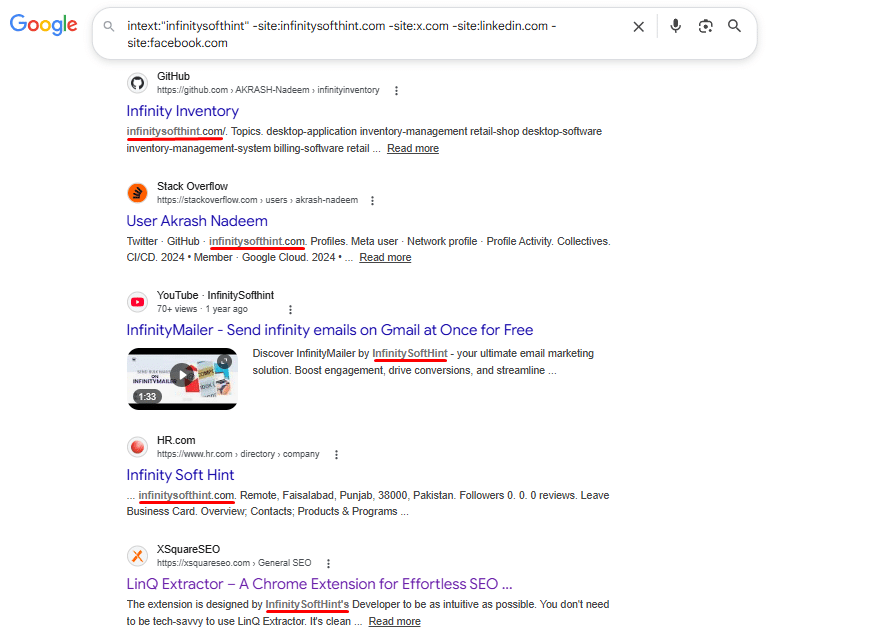
Your next step is simply to reach out to the editor and politely ask them to make that mention clickable.
Finding Contextual PR Mentions with AROUND(X)
While exact match searches are great, the AROUND(X) operator is a hidden gem for Digital PR. It allows you to find highly contextual mentions of your brand that appear near a specific topic.
The formula is: "YourBrand" AROUND(5) "keyword" -site:yourdomain.com
Real-World Example
To demonstrate this, we searched for pages where “HubSpot” and “SEO” appear within five words of each other, while excluding HubSpot’s own website:
"HubSpot" AROUND(5) "SEO" -site:hubspot.com
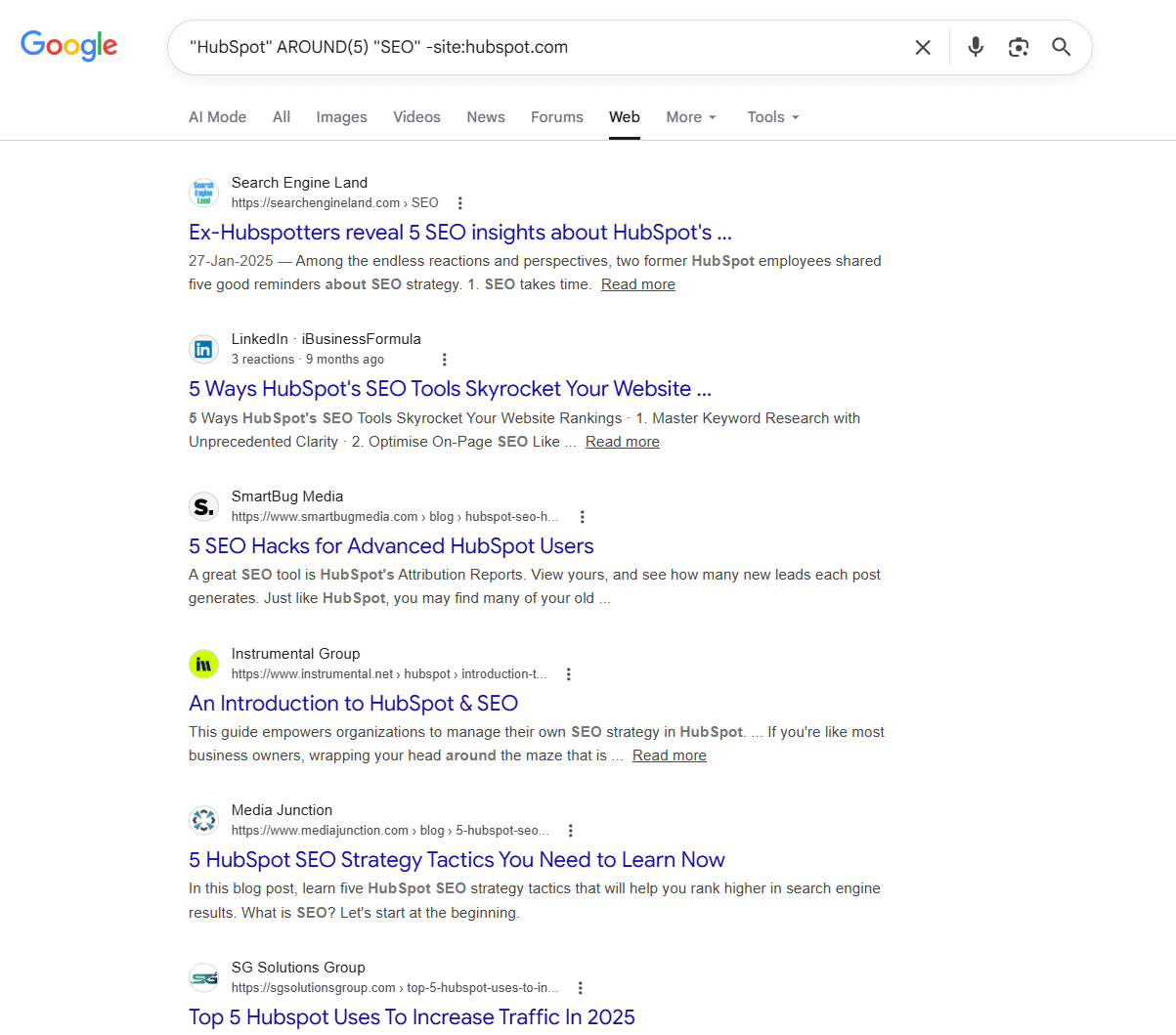
The results surfaced high-quality third-party sites, including Search Engine Land, SmartBug Media, and Media Junction, all of which mentioned HubSpot in a direct SEO context.
This is pure Digital PR intelligence. Every one of these results is a potential unlinked brand mention. Your next step is simply to reach out to the editor and politely request that they turn that mention into a clickable link.
One Important Note:
Always exclude your own domain using -site:yourdomain.com. Without this exclusion, Google will flood your results with your own pages, defeating the entire purpose of the search.
Finding Mentions of Key Executives & Founders
Often, journalists and bloggers will not mention the company name directly. Instead, they quote the CEO, founder, or a key executive from an interview or a podcast. If you are only tracking your brand name, you are missing dozens of high-value PR opportunities.
To track these executive mentions, combine the intext: operator with the OR operator and your exclusion command:
intext:"Your Name" OR intext:"CEO Name" -site:yourdomain.com
Real-World Example
To demonstrate this, we tracked mentions of OpenAI’s CEO using:
intext:"Sam Altman" OR intext:"OpenAI CEO" -site:openai.com
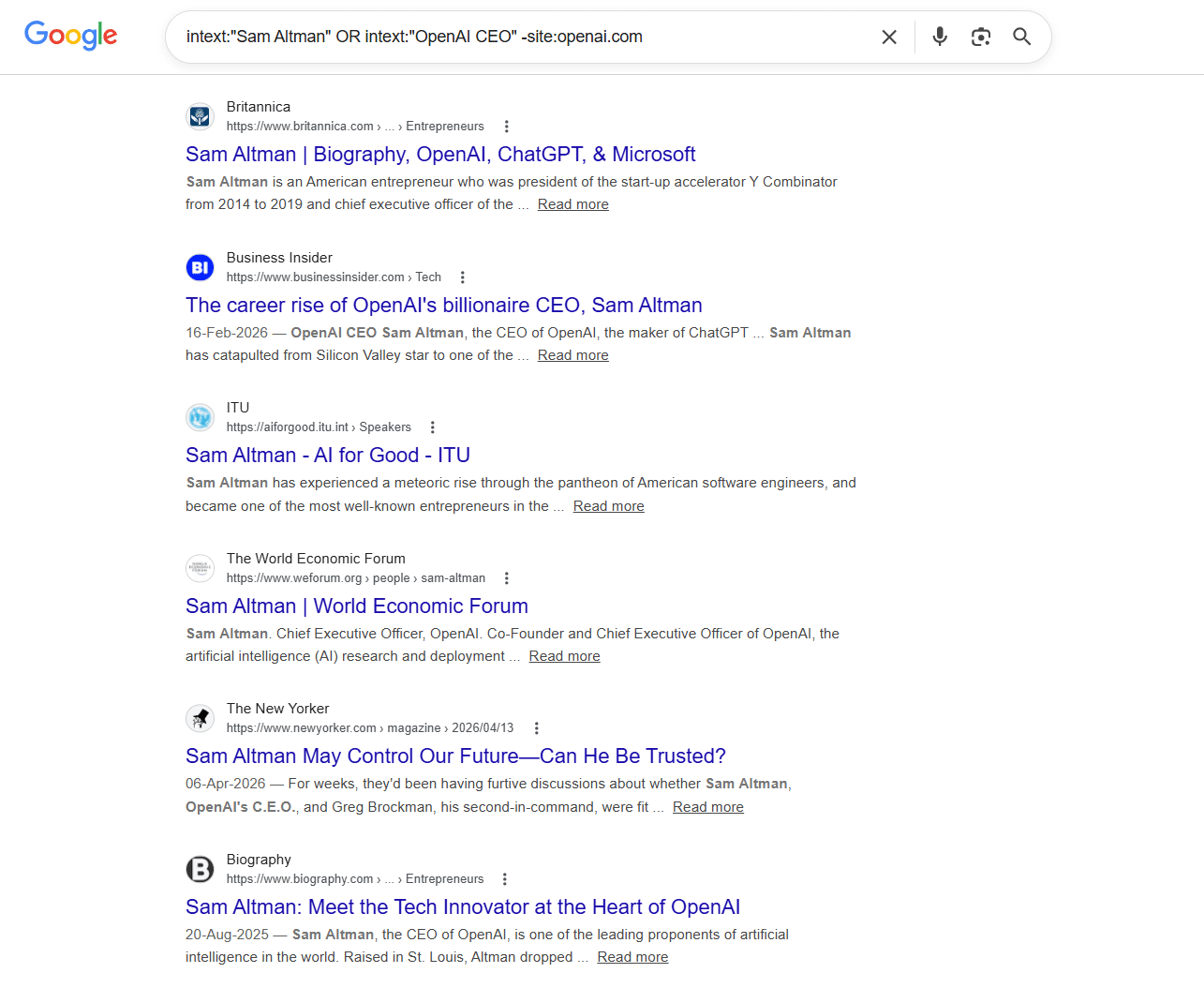
The results surfaced some of the most authoritative publications on the internet, such as Britannica, Business Insider, the World Economic Forum, and The New Yorker, all of which mentioned Sam Altman directly without linking back to OpenAI.
Each one of these is a potential backlink opportunity. A simple outreach email asking the editor to make that mention clickable could earn you a link from a domain with enormous authority.
Why This Works: The OR operator tells Google to find pages containing either term, so you capture mentions of the person’s name AND their job title simultaneously. This doubles your chances of finding unlinked mentions that a simple brand-name search would miss.
2. Discovering Active Journalist Requests & PR Opportunities
Digital PR is not just about reacting to what is already published; it is about getting involved before the story goes live. Instead of waiting for emails from PR platforms, you can proactively hunt down journalists who are actively seeking expert opinions right now.
Hunting for Expert Quotes and Pitch Requests
Journalists constantly need subject matter experts to quote in their articles. If you can provide a valuable insight, they will gladly reward you with a brand mention and a backlink.
To find these live requests, use this combination:
intitle:"journalist request" OR intitle:"looking for experts" "SEO"
Pro Tip for Social Media: This strategy works exceptionally well on platforms like X (formerly Twitter). Journalists often post there when they need a quick source. You can modify the search to scan X directly: site:x.com "looking for experts" OR "pitch me"
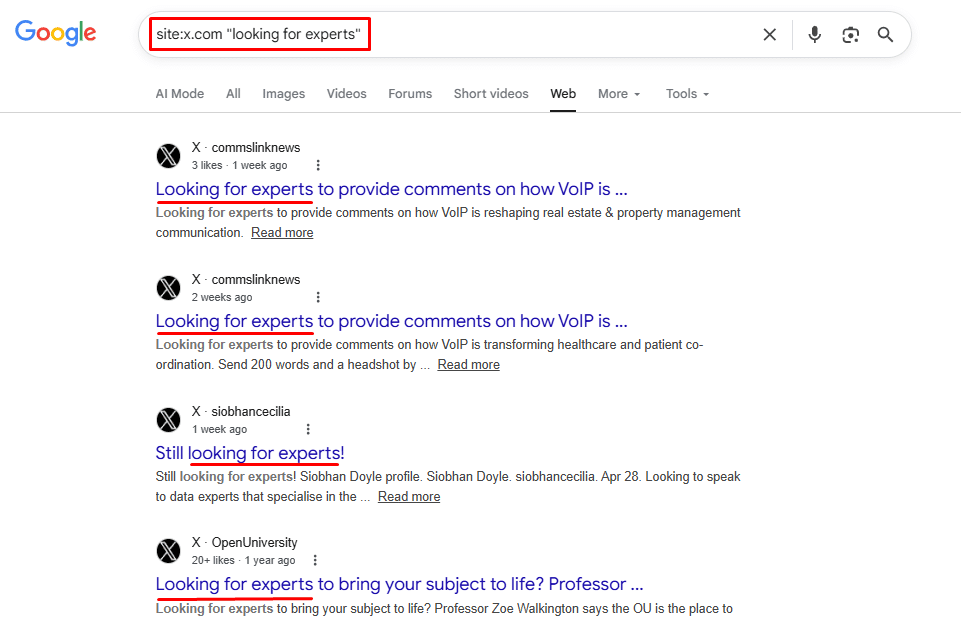
As you can see in the screenshot above, using the site:x.com operator combined with exact-match quotes instantly cuts through the social media noise. Instead of scrolling through an algorithmic feed, Google pulls up specific, indexed posts from individuals and professionals who are actively seeking expert input. When you spot a relevant query, your next step is simply to click through to the post and reply or DM the author with a brief, high-value pitch.
Using the source: Operator for Targeted News
If you have a specific top-tier publication in mind for your PR pitch, you need to understand exactly what they are covering. The source: operator restricts your search to a specific news outlet within Google News, allowing you to tailor your pitch perfectly.
Try these exact formulas:
"core update" source:search_engine_journal"AI search engines" source:techcrunch
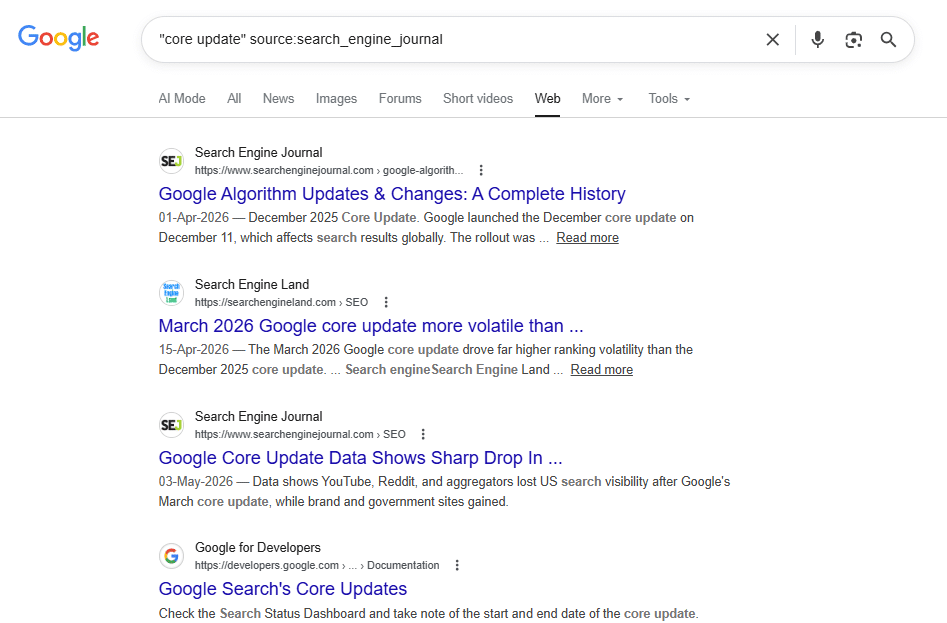
By analyzing their recent coverage on your topic, you can pitch a unique angle that fits their editorial style perfectly.
Notice in the above image how the source: The operator completely eliminates all other websites and displays only articles published by Search Engine Journal. For a Digital PR professional, this is a goldmine.
By analyzing these specific results, you can see exactly which journalists are covering “core updates,” what angles they prefer, and how frequently they write about it. Instead of sending a generic pitch, you can now email that specific journalist with an idea tailored perfectly to their recent coverage history, drastically increasing your chances of getting published.
Uncovering Niche Podcasts and Interview Slots
Podcasts are a massive pillar of modern Digital PR. Earning a guest spot not only builds incredible brand authority but also almost always secures a high-DR backlink from the episode’s show notes.
To bypass generic directories and find podcasts that are actively looking for guests in your niche, use these commands:
intitle:"podcast" inurl:guest "SaaS marketing"intitle:"podcast" "SaaS founders" "be a guest"
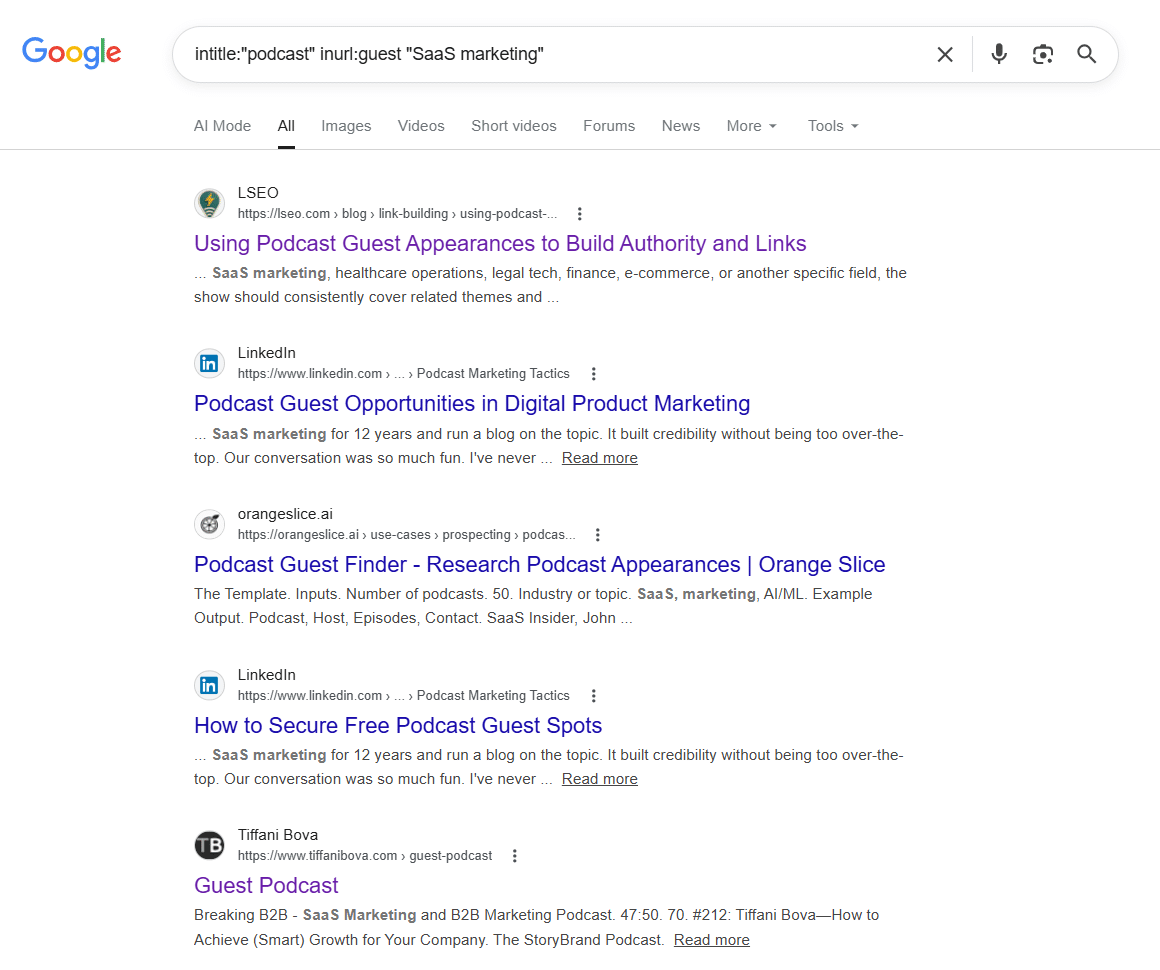
This cuts through the noise and surfaces podcast shows, guest guides, and opportunity pages directly related to your niche, giving you a highly targeted shortlist to begin your outreach.
3. Tracking Competitor PR Campaigns
In Digital PR, your competitors are often your best resource. If a publication or journalist has written about a competitor, it proves two things: they cover your specific niche, and they are willing to link out to companies like yours.
Reverse-Engineering Competitor Mentions
To see exactly where your competitors are getting featured, apply the same logic we used to find unlinked brand mentions but point it at your competitor instead:
intext:"competitor brand" -site:competitor.com
Real-World Example
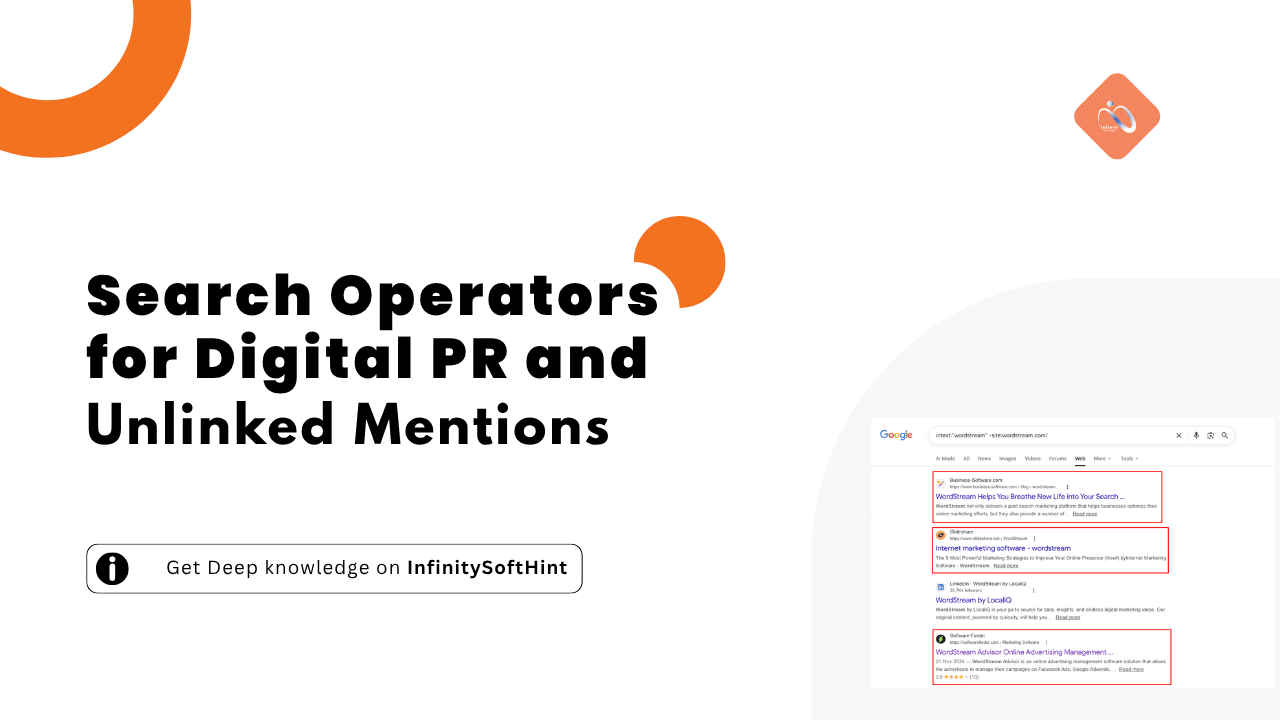
We tested this using WordStream, a well-known PPC and digital marketing tool:
intext:"wordstream" -site:wordstream.com
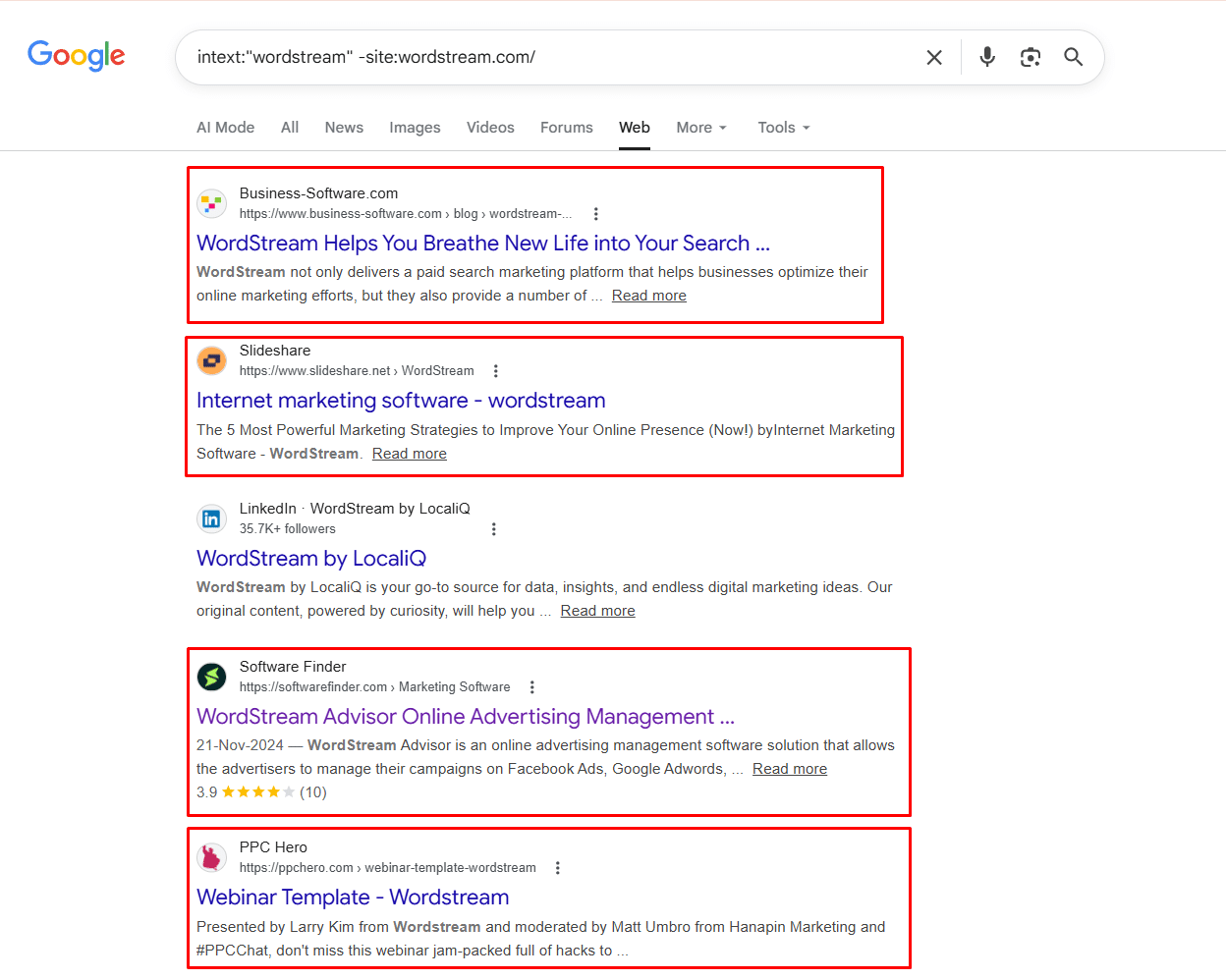
The results immediately revealed high-value third-party placements, Business-Software.com, Slideshare, Software Finder, and PPC Hero, all featuring WordStream in their content.
Each red-boxed result in the screenshot above represents a direct outreach opportunity. If these publications wrote about WordStream, they are clearly interested in covering tools in this space. A well-crafted pitch could earn you a spot in their next roundup or listicle.
By building this list systematically across your top five competitors, you can construct a highly targeted media outreach list in under an hour, without paying for a single PR tool.
Tracking High-Tier Media Placements
If you want to see if a competitor has managed to crack top-tier media outlets, you can force Google to search exclusively within those massive publications.
intext:"competitor.com" site:forbes.com OR site:techcrunch.com OR site:entrepreneur.com
This reveals their high-level PR strategy and shows you exactly which journalists at top publications are receptive to pitches in your industry.
Real-World Example
We tested this using monday.com, a popular project management SaaS tool:
intext:"monday.com" (site:forbes.com OR site:techcrunch.com)
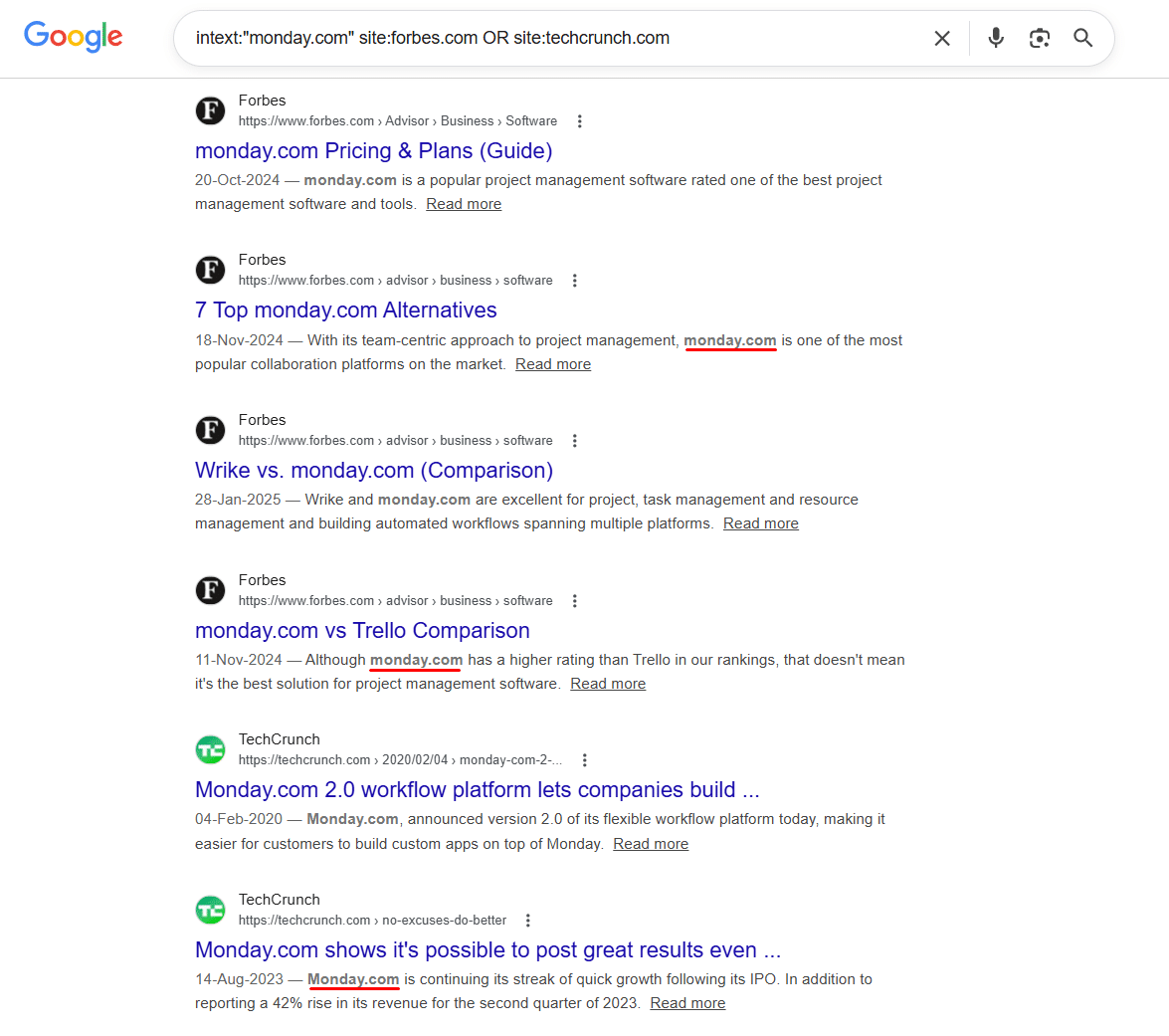
The results were immediate and highly actionable. Forbes alone had multiple placements, a pricing guide, an alternatives listicle, and direct comparison articles against Wrike and Trello. TechCrunch had covered monday.com’s product launches and growth milestones.
This tells you two critical things. First, which journalists at Forbes and TechCrunch are actively covering tools in your category? Second, what content formats, comparisons, pricing guides, and alternative lists are getting your competitors placed in top publications?
Your next step is to pitch those exact journalists with a similar angle for your own product.
4. Filtering for Recent PR Coverage (Temporal Operators)
In the world of PR, old news is dead news. Reaching out to a journalist about an article they wrote five years ago will rarely yield results. You need fresh, active opportunities.
Finding Fresh Mentions with the after: Operator
To ensure you are only finding websites that have mentioned your brand or industry very recently, you must use Google’s temporal operators.
"your keyword" after:2026-01-01 -site:yourdomain.com
You can adjust the date to whatever timeframe you need. This ensures that every PR opportunity you find is fresh, and the authors are likely still active and monitoring their recent posts.
Tracking Specific PR Campaigns (Combining Temporal Operators) If you recently launched a PR campaign and only want to track media coverage generated during that specific timeframe, you can combine the before: and after: operators.
Real-World Example
To demonstrate this, we tracked mentions of Seobility, an SEO audit tool, published strictly within a single month:
Formula: "seobility" after:2026-03-01 before:2026-04-01 -site:seobility.net
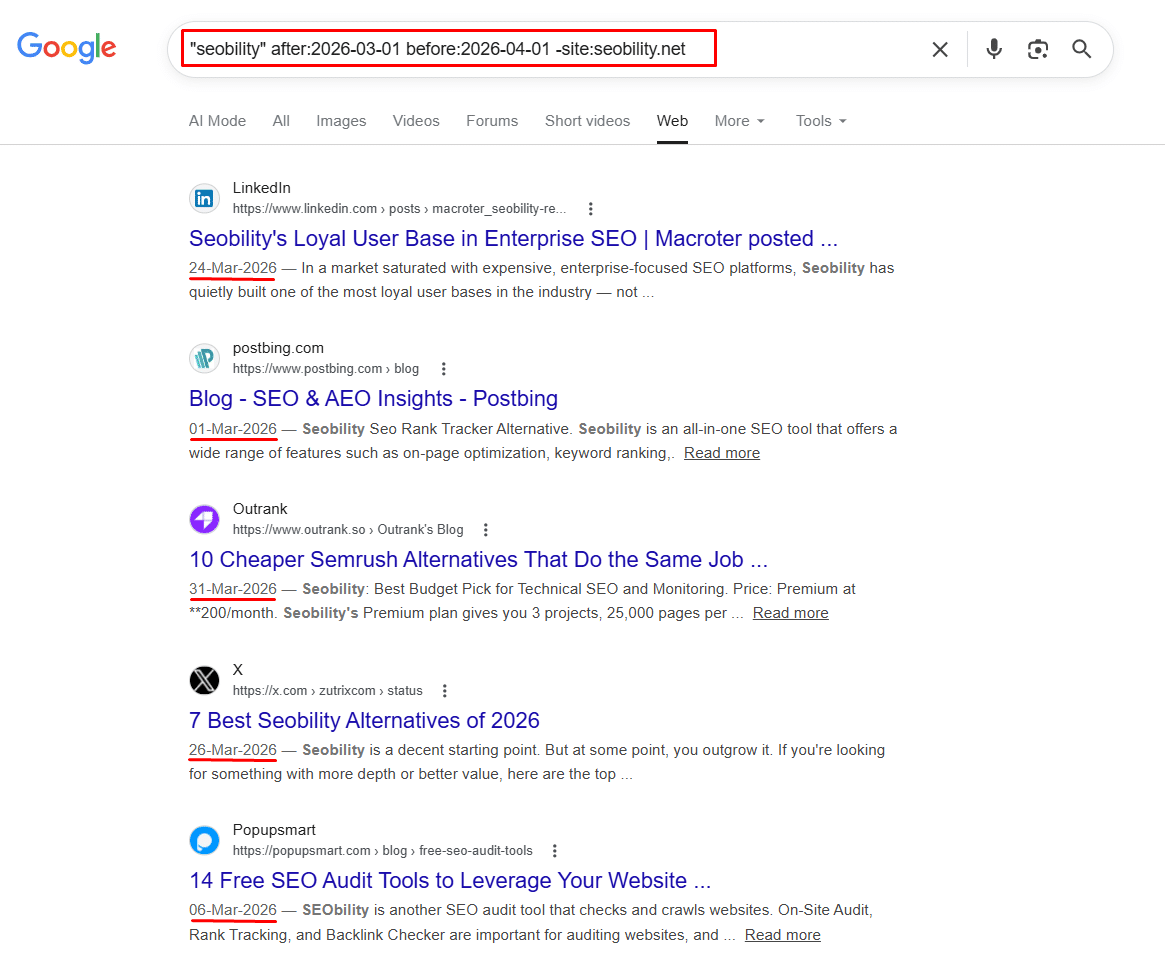
How it works: This restricts your search results to mentions published strictly between March 1st and April 1st, 2026. It is the perfect professional method to accurately measure the media impact of a specific PR push or press release. As you can see in the above image, every result returned was dated within that exact window – LinkedIn, Postbing, Outrank, X, and Popupsmart all published Seobility mentions in March 2026. This level of precision is impossible to achieve with standard Google searches or social listening tools, and it costs nothing.
Do you have to manually click and check every single link for mentions?
Absolutely not. Finding the search results is only step one; extracting the data is step two. Instead of manually opening hundreds of tabs to see if a mention is dofollow, nofollow, or unlinked, you can automate the process. We highly recommend using the LinQ Extractor Chrome Extension by InfinitySoftHint. Once you run your search operator, simply activate the extension, and it will automatically extract all links on the page, highlighting the dofollow and nofollow status so you can focus only on the best PR targets.
Knowing how to use search operators for Digital PR gives you a massive advantage over agencies relying solely on expensive, automated databases. You can uncover hidden podcast slots, real-time journalist requests, and unlinked brand mentions directly from Google’s live index.
However, finding the mention is only 20% of the work. The real magic happens in the outreach. If you need help turning these raw search results into high-authority backlinks and top-tier media placements, we are here to help. At InfinitySoftHint, we specialize in advanced Digital PR, Guest Post Collaboration, and custom link-building strategies tailored for SaaS and B2B companies. Contact our team today to scale your brand’s authority.
If you are ready to take your outreach game to the next level and learn how to pitch these newly found targets, make sure to read our comprehensive guide on Advanced Search Operators for Link Building.
Next Step: Once you have claimed your unlinked mentions and secured your PR backlinks, ensure your website’s technical architecture is fully optimized to receive that link equity. Read our complete guide on Search Operators for Technical SEO to streamline your next site audit and fix indexing issues for free.