Google search operators are special commands and characters that extend the capabilities of standard text searches. Their primary purpose is to help you search on Google effectively, narrowing broad search results and pinpointing specific information, such as exact phrases, document types, or data from a specific domain.
While an average user relies on basic queries, SEO professionals, content marketers, and researchers use these operators to analyze competitors, discover content gaps, perform technical audits, and uncover high-quality link-building opportunities.
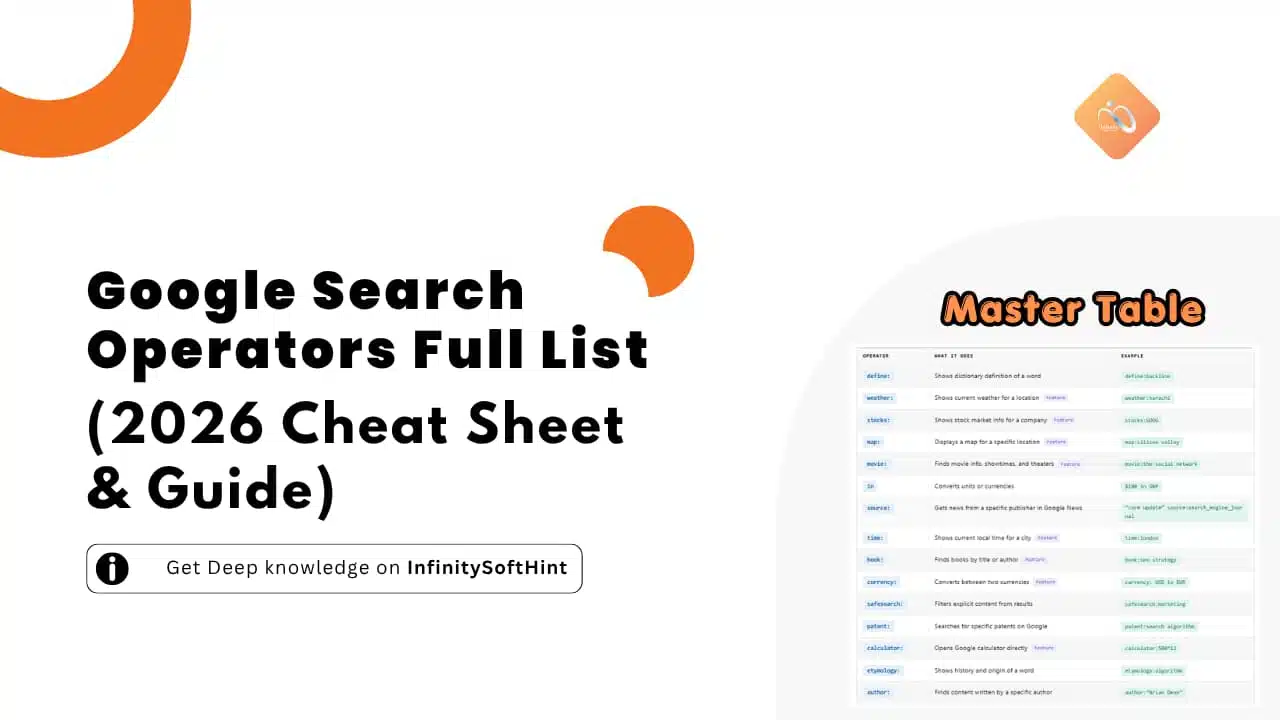
What makes this guide truly unique is our meticulously organized master table that compiles the full list of search operators working reliably in 2026. Whether you need basic filters or advanced SEO combinations, this comprehensive Google search commands cheat sheet will serve as your ultimate, quick-reference resource.
(Note: If you want to learn more about the history, pros, and cons of these commands, read our basic guide: What are Google Search Operators?)
The Ultimate Google Search Operators Full List Cheat Sheet (Master Table)
This guide serves as a definitive resource for Google search operators in 2026, categorizing functional commands while flagging deprecated or unreliable syntaxes. Included is an essential cheat sheet engineered to help you master the most powerful and active search characters for pinpoint precision.
To save your time and eliminate the guesswork, we have tested and compiled a total of 61 Google search operators in this guide. Out of these, 46 are fully working and reliable in 2026, 5 are highly unreliable or hit-or-miss, and 10 are completely deprecated or dead (meaning Google has officially removed them). This ensures you don’t waste time on outdated commands and only focus on the ones that actually drive results today.
cache: operator was deprecated in 2024. Click any example to instantly copy it.Basic / Logic
| Operator | What it does | SEO Example |
|---|---|---|
| “” | Finds an exact phrase in that specific order | “technical seo audit” |
| – | Excludes a word from search results | seo optimization -jobs |
| OR | Shows results with either term (pipe symbol | also works) | seo OR sem marketing |
| AND | Ensures both terms appear in results | seo AND “content marketing” |
| NOT | Excludes a term — same as using – | link building NOT paid |
| * | Wildcard — replaces any unknown word | best * for SEO |
| () | Groups multiple terms for complex searches | (seo OR sem) marketing |
| @ | Searches a topic on social media — use @x not @twitter Updated | @x “seo tips” |
Site & URL
| Operator | What it does | SEO Example |
|---|---|---|
| site: | Restricts results to a specific website | site:ahrefs.com seo |
| inurl: | Finds a word or phrase inside the page URL | inurl:write-for-us “seo” |
| allinurl: | Finds multiple words together within the URL | allinurl:best seo tools |
| related: | Finds websites similar to a specific domain | related:moz.com |
| groupbyurl: | Groups results by URL to remove duplicates | groupbyurl:seo agency |
Title & Text
| Operator | What it does | SEO Example |
|---|---|---|
| intitle: | Finds a specific word in the page Title tag | intitle:”link building” |
| allintitle: | Finds multiple words together in the Title tag | allintitle:seo beginner guide |
| intext: | Finds a word in the webpage body content | intext:”guest post” |
| allintext: | Finds multiple words together in body content | allintext:seo audit checklist |
| inbody: | Finds a phrase in body content — primarily a Bing operator, unreliable on Google Bing-first | inbody:”keyword research” |
| AROUND(X) | Sets a max distance of X words between two terms | SEO AROUND(3) strategies |
File Formats
| Operator | What it does | SEO Example |
|---|---|---|
| filetype: | Finds specific file types — PDF, DOCX, XLSX, etc. | seo guide filetype:pdf |
| ext: | Same as filetype: — finds specific file extensions | seo audit ext:pdf |
Time & Date
| Operator | What it does | SEO Example |
|---|---|---|
| before: | Finds content published before a specific date | “seo trends” before:2024-01-01 |
| after: | Finds content published after a specific date | seo after:2024-01-01 |
Info & Tools Items marked Feature are Google shortcuts, not true search operators
| Operator | What it does | Example |
|---|---|---|
| define: | Shows dictionary definition of a word | define:backlink |
| weather: | Shows current weather for a location Feature | weather:karachi |
| stocks: | Shows stock market info for a company Feature | stocks:GOOG |
| map: | Displays a map for a specific location Feature | map:silicon valley |
| movie: | Finds movie info, showtimes, and theaters Feature | movie:the social network |
| in | Converts units or currencies | $100 in GBP |
| source: | Gets news from a specific publisher in Google News | “core update” source:search_engine_journal |
| time: | Shows current local time for a city Feature | time:london |
| book: | Finds books by title or author Feature | book:seo strategy |
| currency: | Converts between two currencies Feature | currency: USD to EUR |
| safesearch: | Filters explicit content from results | safesearch:marketing |
| patent: | Searches for specific patents on Google | patent:search algorithm |
| calculator: | Opens Google calculator directly Feature | calculator:500*12 |
| etymology: | Shows history and origin of a word | etymology:algorithm |
| author: | Finds content written by a specific author | author:”Brian Dean” |
⚡ Power Combinations — operators combined for advanced searches
site:example.com inurl:blog intitle:”seo”
Find blog posts about SEO on a specific site
filetype:pdf “seo audit” after:2023-01-01
Recent SEO audit PDFs published after 2023
inurl:write-for-us (seo OR “digital marketing”)
Find guest post opportunities in SEO or marketing
site:reddit.com “best seo tools” after:2024-01-01
Recent Reddit discussions about SEO tools
intitle:”seo” -site:youtube.com filetype:pdf
SEO PDF guides, excluding YouTube results
related:semrush.com -site:semrush.com
Find SEMrush competitors, excluding their own site
These operators are no longer officially supported or return highly inconsistent results. Use with caution and always verify output.
| Operator | What it does | Example |
|---|---|---|
| .. / #..# | Searches between a range of two numbers — both are separate operators but behave inconsistently on Google | seo course $50..$150 |
| inanchor: | Finds a word inside anchor text of inbound links | inanchor:”guest post” |
| allinanchor: | Finds multiple words together in anchor text | allinanchor:best seo tools |
| loc: / location: | Restricts results to a specific geographic location | loc:”karachi” seo agency |
| daterange: | Finds results within a date range using Julian date format — rarely works correctly | daterange:23001-23091 SEO |
Google has officially retired these operators. They do nothing today, even if older articles still mention them.
| Operator | What it used to do | When retired |
|---|---|---|
| cache: | Showed the cached version of a webpage | 2024 |
| ~ | Included synonyms and similar words in results | 2013 |
| + | Forced exact match for a single word (replaced by quotes) | 2011 |
| link: | Found pages linking back to a specific URL | 2017 |
| info: / id: | Showed basic information about a website | 2017 |
| phonebook: | Found phone numbers for people or businesses | 2010 |
| # | Searched hashtags on Google+ (Google Plus) | 2019 |
| inpostauthor: | Found posts by a specific author in Google Blog Search | End of Blog Search |
| allinpostauthor: | Found multiple author name variations in Blog Search | End of Blog Search |
| inposttitle: | Searched words in blog post titles | End of Blog Search |
| blogurl: | Searched for specific blog URLs | Dropped |
Advanced Google Search Operators Combinations (Use Cases for SEOs)
The true magic happens when you stack these operators together to execute complex SEO tasks.
1. Finding High-DR Guest Post Opportunities
Stop searching for basic terms and competing with everyone else. Combine Boolean logic to find hidden SaaS leads and pure-niche guest posts: (intitle:"write for us" OR inurl:contribute) "target keyword" -site:medium.com -site:linkedin.com
💡 Pro Tip for Link Builders: Manually checking thousands of scraped URLs for Do-Follow/No-Follow tags takes hours. Instead, use the InfinitySoftHint LinQ Extractor Chrome Extension. With a single click, it scans target pages and instantly extracts and highlights do-follow and no-follow links, saving you time!
Additionally: If you want to master these outreach strategies and discover more hidden formulas for B2B SaaS leads? Check out our dedicated guide on Advanced Search Operators for Link Building & Guest Posts.
2. Discovering Content Gaps
Identify topics your competitors have covered, but you haven’t: site:competitor.com -site:yourdomain.com "target topic"
3. Finding Plagiarized or Duplicate Content
Worried that someone is scraping your articles? Take a unique sentence from your post and search: "your exact unique sentence goes here" -site:yourdomain.com This will reveal any external sites that have copied your content without permission.
4. Finding Internal Linking Opportunities
Easily find pages on your own website that mention a specific keyword but don’t yet link to your main pillar page: site:yourdomain.com "target keyword" -inurl:target-page-slug
5. Tracking Unlinked Brand Mentions
Find websites talking about your brand so you can reach out and ask for a backlink: "InfinitySoftHint" -site:infinitysofthint.com -site:twitter.com -site:facebook.com
Bonus: How to Bypass AI Overviews with Operators?
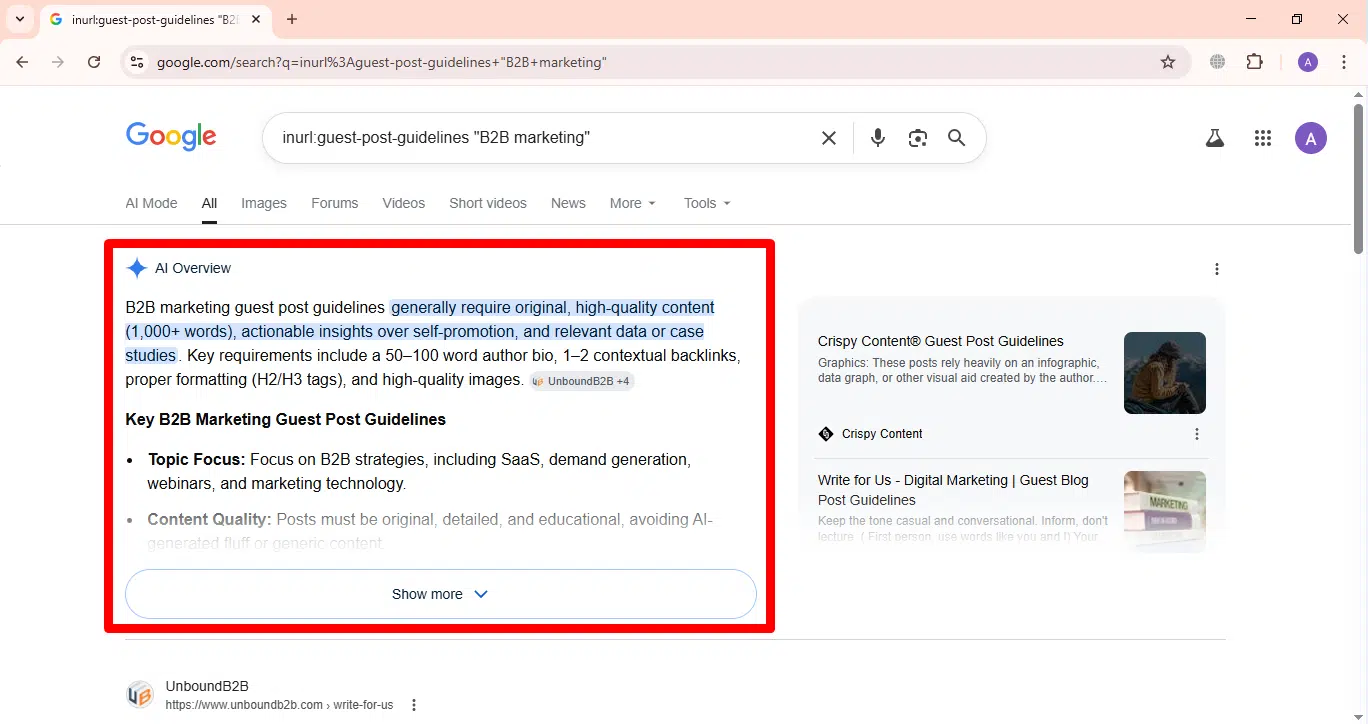
In 2026, Google’s AI Overviews (SGE) can sometimes clutter the search results when you are trying to perform a clean, data-driven SEO audit. If you want to bypass these AI summaries and force Google to show you the traditional “10 blue links,” you can use a simple URL parameter trick.
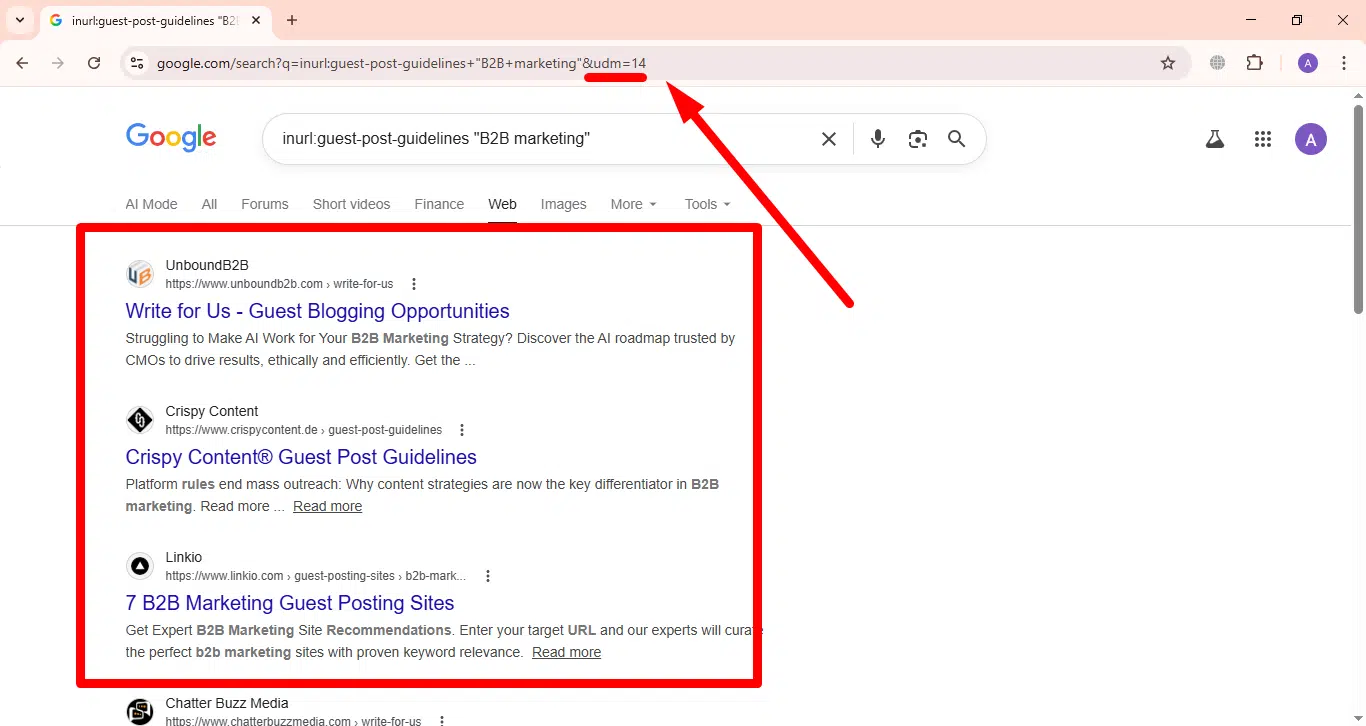
Simply append the parameter &udm=14 to the end of the URL in your browser’s address bar after running your operator search.
Example: Finding Pure Links Without AI Interference
Let’s say you are running a search to find guest post opportunities in the B2B marketing niche:
- Your Search Query:
inurl:guest-post-guidelines "B2B marketing" - The Problem: When you hit search, Google might generate an AI Overview summarizing general guest posting tips, which pushes the actual target links down the page.
- The Bypass Trick: Go to your browser’s top address bar. Your URL will look something like this: https://www.google.com/search?q=inurl:guest-post-guidelines+”B2B+marketing”
- The Solution: Add
&udm=14to the very end of that URL and press Enter: https://www.google.com/search?q=inurl:guest-post-guidelines+”B2B+marketing”&udm=14
The Result: The AI Overview will instantly disappear, leaving you with a clean, classic Search Engine Results Page (SERP) showing exactly the websites you need to target for your link-building outreach.
Conclusion & Next Steps
Mastering Google search operators is the difference between blindly clicking through SERPs and executing a highly targeted SEO strategy. By utilizing the advanced strings in this cheat sheet, you can filter out spam, reverse-engineer competitors, and discover high-quality backlink prospects.
To automate your workflow even further, don’t forget to equip your browser with the LinQ Extractor for instant link analysis, and explore InfinitySoftHint’s Outreaching & Link Building Services to let our experts scale your SaaS growth!