

Most content marketing teams approach competitor research backward. They begin by paying hundreds of dollars every month for third-party SEO tools that rely on pre-computed keyword databases and estimated click-through rates. While third-party crawlers have their place, they often suffer from significant database lag, miss freshly published or non-linked assets, and fail to reveal the underlying editorial taxonomy of your rivals.
The most accurate, real-time intelligence database on the web is already available at zero cost: Google’s live search index.
By combining advanced Google search commands (also known as search operators), you can interrogate Google’s index directly. This allows you to reverse-engineer your competitors’ editorial calendars, isolate their gated lead magnets, identify semantic gaps across entire industries, and uncover exactly how search engines categorize their topical authority.
If you are just getting started with search commands, explore our foundational breakdown on What Are Google Search Operators? or bookmark the complete Google Search Operators Full List for reference. In this actionable guide, we focus strictly on formulas, workflows, and advanced search strings designed for competitive content analysis.
1. How to Research Competitor Content Using Google Search Operators?
Competitor content research using search operators is the practice of querying Google’s index with specific syntax commands (such as site:, inurl:, intitle:, and Boolean modifiers) to filter, isolate, and evaluate a rival’s published assets without relying on third-party aggregators.
Standard Search: [ marketing automation guides ]
→ Returns millions of mixed results, ads, and broad aggregators.

Operator Query:  [ site:competitor.com inurl:guide "marketing automation" ]
→ Extracts only the competitor's exact editorial guides on that precise topic.
The Core Advantages of Operator-Based Audits
- 100% Direct Index Data: You are not looking at a third-party tool’s cached estimation; you are inspecting the exact URLs currently indexed by Google’s crawlers.
- Zero Software Overhead: You do not need expensive software subscriptions to map out a rival’s topical depth or discover their editorial roadmap.
- Instant Detection of Content Pivots: When a competitor launches a new product line, subcategory, or resource hub, operator queries reveal indexed pages within hours of publication.
- Taxonomy & Architecture Clarity: Operator strings reveal internal URL patterns, subfolder structures, and content hierarchies that database scrapers rarely expose cleanly.
2. Why Use Search Operators Over Third-Party SEO Tools?
While enterprise platforms are valuable for historical domain rating estimations, manual search operator audits provide distinct qualitative advantages:
| Audit Parameter | Third-Party SEO Tools | Google Search Operators |
|---|---|---|
| Data Freshness | Delayed (weekly/monthly crawls) | Live (Google’s real-time index) |
| Asset Discovery | Often skips unlinked PDFs, whitepapers | Discovers all indexed file types (filetype:pdf) |
| URL Taxonomy | Aggregated list views | Precise directory isolation (inurl:, allinurl:) |
| Cost | $100 – $999+ / month | $0 (Completely Free) |
| Query Flexibility | Constrained by tool UI filters | Infinite Boolean combinations (OR, AND, -, AROUND) |
Finding “Ghost” & Orphaned Assets
Competitors often create standalone landing pages, unlinked customer guides, or experimental content hubs that are not linked in their main navigation menus. Because standard crawlers follow link paths starting from the homepage, they can miss these pages entirely. If Google’s crawler discovers and indexes them through an XML sitemap or external mention, search operators will surface them immediately.
Why do some competitor URLs fail to appear in site: searches?
I know my competitor published an article, but when I run site:competitor.com “keyword”, it doesn’t show up in the SERP. Why is that?
Here’s the answer when an active page does not appear in a site: query, it generally stems from one of four reasons:
- Google Index Sampling: For domains with thousands of indexed pages, a generic
site:domain.comquery only renders an approximate sample. Google trims deep pagination to conserve compute resources. To force Google to reveal the target URL, refine your query with narrowing operators:site:competitor.com/blog/ intitle:"Exact Keyword" noindexDirectives: The competitor may have deliberately placed anoindexmeta tag on that specific page (common with private sales decks, PPC landing pages, and gated webinar thank-you pages).- Canonicalization Consolidation: If the competitor published duplicate or highly similar versions of an article, Google may have consolidated the URL to a canonical page, hiding the duplicate from standard search results.
- Crawl & Indexation Lag: If the post was published recently, Google may have crawled the page but not yet added it to the index it serves from.
(For a deeper dive into diagnosing indexing discrepancies, see our guide on Search Operators for Technical SEO.)
3. 7 Advanced Search Operator Formulas for Competitor Content Auditing
Below are seven production-tested formulas for extracting deep competitor intelligence directly from Google.
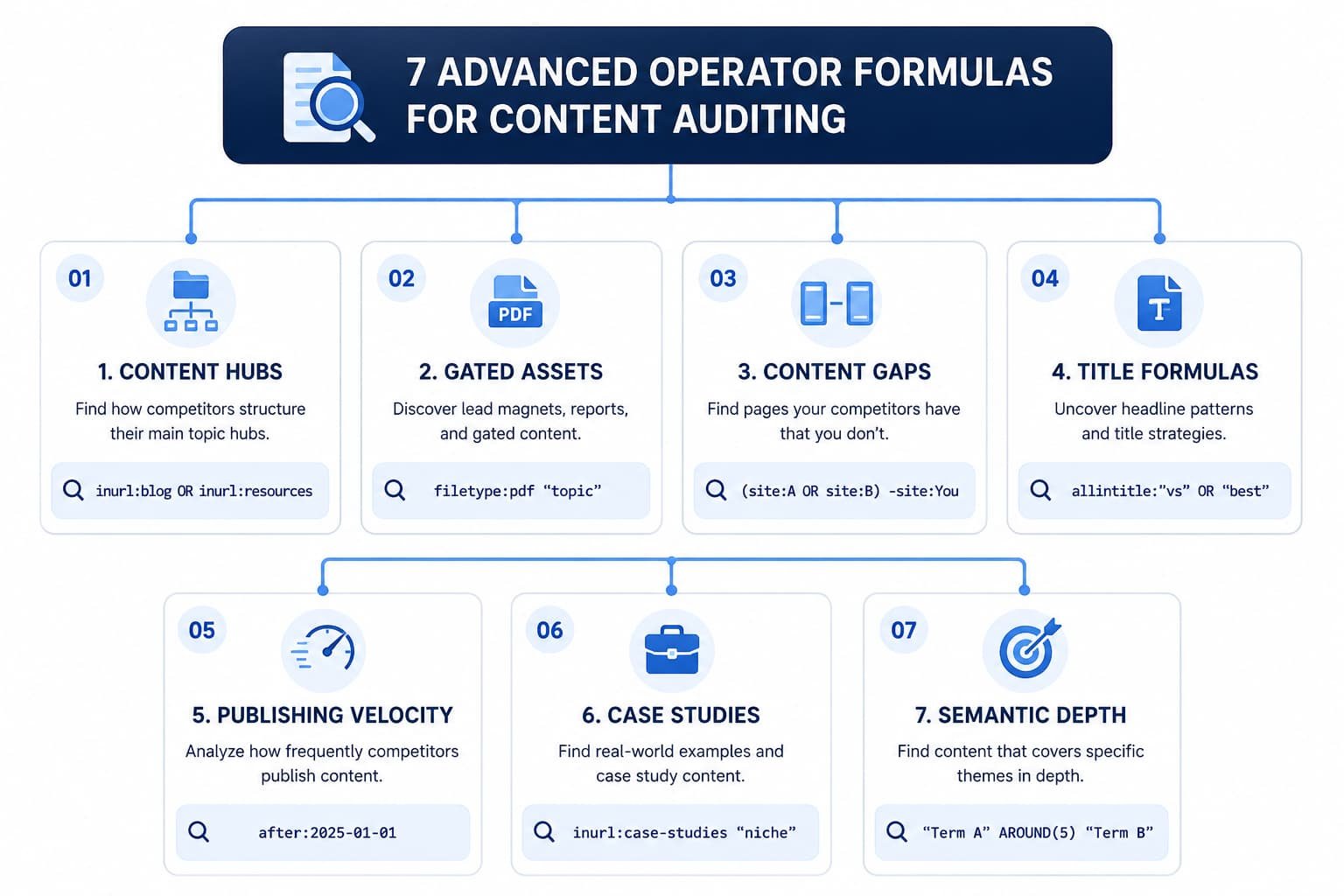
Formula 1: Dissecting Competitor Content Hubs & Taxonomy
Most large websites organize content across distinct directories (/blog/, /resources/, /learn/, /guides/). To audit what formats a competitor prioritizes, isolate their subfolders using Boolean grouping.
- Formula:
site:competitor.com (inurl:blog OR inurl:guides OR inurl:resources OR inurl:knowledge-base) - Real-World Application:
site:clickup.com (inurl:blog OR inurl:templates) "project management" - Strategic Insight: This reveals whether your competitor relies on traditional educational blog posts or programmatically generated template pages to capture search demand.
Formula 2: Uncovering Gated Assets, Templates & Lead Magnets
Competitors frequently upload valuable content assets. Such as whitepapers, original research reports, spreadsheet templates, and customer worksheets without password-protecting the files.
- Formula:
site:competitor.com (filetype:pdf OR filetype:xlsx OR filetype:docx OR filetype:csv) "target keyword" - Real-World Application:
site:hubspot.com (filetype:pdf OR filetype:xlsx) "editorial calendar" - Strategic Insight: You can inspect the exact templates and downloadables your competitors use to capture leads. Use these insights to build more comprehensive, interactive, or freely accessible alternatives that out-convert their gated forms.
Formula 3: Identifying Multi-Competitor Content Gaps
Instead of auditing competitors one by one, you can query multiple rival domains simultaneously to verify whether a topic is an industry standard—and check whether your own domain is missing from the conversation.
- Formula:
(site:competitorA.com OR site:competitorB.com OR site:competitorC.com) "target topic" -site:yourdomain.com - Real-World Application:
(site:zapier.com OR site:make.com) "webhook troubleshooting" -site:infinitysofthint.com - Strategic Insight: If two or three direct rivals have published dedicated coverage on a subtopic while your site yields zero results, you have identified a high-priority topic gap to add to your editorial roadmap.
Formula 4: Reverse-Engineering Exact-Match Title Formulas
High-intent search traffic often centers on commercial investigation terms such as “vs,” “alternative,” “review,” and “pricing.” You can extract every comparative post a competitor has built in seconds.
- Formula:
site:competitor.com allintitle:"vs" OR "alternative" OR "review" OR "best" - Real-World Application:
site:monday.com allintitle:"vs" OR "alternative" - Strategic Insight: This surfaces your competitor’s entire bottom-of-the-funnel (BOFU) comparison strategy. You can see which alternatives they actively target and which competitors they intentionally avoid comparing against.
Formula 5: Tracking Competitor Publishing Velocity & Topic Pivots
Understanding when a competitor shifts their content strategy is critical. Google’s temporal operators (after: and before:) allow you to track how frequently a competitor produces content and identify new categories they are prioritizing.
- Formula:
site:competitor.com/blog/ after:2025-01-01 "AI" OR "automation" - Real-World Application:
site:intercom.com/blog/ after:2025-06-01 "customer service agent" - Strategic Insight: By isolating publication volume within a specific date range, you can measure a competitor’s content velocity and detect strategic thematic pivots months before they impact industry market share.
Case studies provide direct insight into which vertical markets and customer segments your competitor targets most aggressively.
- Formula:
site:competitor.com (inurl:case-studies OR inurl:stories OR intitle:"case study" OR intitle:"customer story") "industry term" - Real-World Application:
site:stripe.com (inurl:customers OR intitle:"case study") "fintech" - Strategic Insight: Inspecting these pages reveals which industries drive their revenue, which pain points they highlight in buyer conversations, and which enterprise clients they leverage as social proof.
Formula 7: Auditing Semantic Proximity & Topical Depth
The AROUND(X) operator finds pages where two core concepts appear within a specific word distance of each other. This is helpful for checking whether a competitor discusses secondary concepts within their primary guides.
- Formula:
site:competitor.com "primary entity" AROUND(6) "secondary attribute" - Real-World Application:
site:ahrefs.com "technical SEO" AROUND(5) "crawl budget" - Strategic Insight: If a rival covers a core term but never mentions key related sub-entities within close proximity, their coverage is likely high-level or surface-oriented—giving you an opportunity to create a more authoritative piece.
What should you do if Google triggers a CAPTCHA or blocks advanced operator queries?
When I run several complex Boolean operator strings in a row, Google suddenly prompts me with reCAPTCHAs or says “Our systems have detected unusual traffic.” How do I avoid this?
Advanced search operators require significantly more computational processing on Google’s backend than standard natural language queries. Rapidly executing complex strings will quickly flag automated behavior heuristics.
To prevent and resolve CAPTCHA blocks:
- Space Your Queries: Wait 15 to 30 seconds between running complex multi-operator queries.
- Avoid Excessive Wildcard Stacking: Avoid combining multiple
*wildcards with broadORstatements in the same search string. - Use Clean Browser Sessions: Use a dedicated browser profile without aggressive scraper plugins running simultaneously in the background.
- Keep Boolean Strings Focused: Limit nested parentheses to two levels deep (e.g.,
(site:A OR site:B) "keyword"instead of nesting four layers of logic).
4. Step-by-Step 15-Minute Competitor Content Audit Workflow
To turn these search operators into a repeatable operational process, follow this 4-phase audit workflow whenever onboarding a new client or analyzing a market rival.
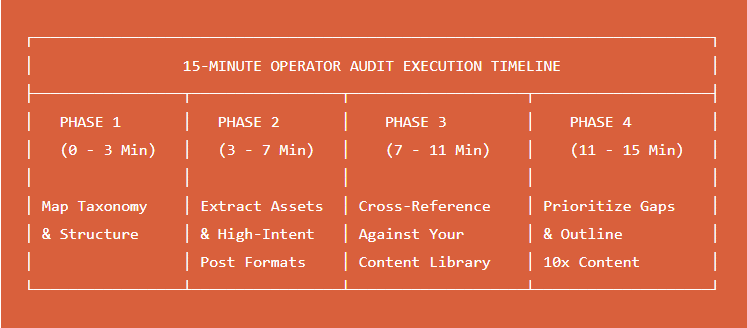
Phase 1: Map the Competitor’s Taxonomy & Content Categories (Minutes 0–3)
Start by identifying how the competitor organizes their site architecture. Run an indexation check across their main educational folders:
site:competitor.com (inurl:blog OR inurl:resources OR inurl:guides)Note their URL slug naming conventions: Do they use /category/topic-name or flat structures like /blog/topic-name? Identify their 3 to 5 core pillar hubs.
Phase 2: Extract High-Intent Target Subtopics & Lead Magnets (Minutes 3–7)
Next, isolate their bottom-of-funnel comparison posts and downloadable assets:
site:competitor.com allintitle:"vs" OR "alternative" OR "best"
site:competitor.com (filetype:pdf OR filetype:xlsx)
Log the software alternatives they compare themselves against and list every free template, checklist, or guide they offer to collect email addresses.
Phase 3: Cross-Reference Against Your Own Content Library (Minutes 7–11)
Take the competitor’s top topics and check whether your site has covered them:
(site:competitor.com) "primary keyword" -site:yourdomain.com
If this query returns several strong competitor URLs while your domain has none, you have confirmed a live content gap.
Phase 4: Prioritize Gaps & Build Outperforming Outlines (Minutes 11–15)
Inspect their top-ranking article for that topic gap. Run a semantic proximity check to evaluate their content depth:
site:competitor.com/blog/ "target topic" AROUND(5) "key sub-concept"
If their article lacks technical depth, actionable code snippets, original data, or downloadable assets, you have the blueprint to build a superior, comprehensive resource.
How often should you run competitor search operator audits?
Is this a one-time setup process, or should it be incorporated into our weekly/monthly routines?
A structured competitive audit schedule balances discovery with operational efficiency:
- Monthly Velocity Spot-Checks (10 mins): Run
site:competitor.com/blog/ after:YYYY-MM-01once a month to review what competitors published in the preceding 30 days. - Quarterly Strategic Gap Reviews (45 mins): Execute the complete 15-minute workflow across your top 3 to 5 competitors to re-evaluate taxonomy shifts, new gated assets, and high-intent comparison queries.
- Immediate Rebrand / Product Pivot Audits: Whenever a major rival announces a funding round, rebrand, or product acquisition, run operator checks across their new directories to track how their messaging and content structure adjust.
Can you automate competitor search operator queries at scale?
Can I feed these operator strings into an automated script or spreadsheet rather than typing them into Google manually?
Yes. While manual searches are ideal for nuanced, ad-hoc discovery, you can scale this intelligence using two approaches:
- Google Sheets (
IMPORTXMLor Apps Script): You can build a monitoring sheet that tracks specific search operator queries via SERP APIs. - Dedicated SERP Scraping APIs: For enterprise content teams monitoring dozens of competitors across multiple countries, passing operator strings (like
site:domain.com after:DATE) through an API endpoint allows you to pipe newly indexed competitor URLs directly into your project management tools (e.g., Notion, Airtable, or Jira).
Important Note: Avoid running automated scrapers directly through personal browser sessions without proxy rotation, as this will trigger instant IP-level rate limits and CAPTCHAs.
5. Pro Tip: Bypassing AI Overviews for Clean SERP Analysis
When running competitor audits on Google, the search results page often populates with AI Overviews (SGE), sponsored ads, and aggregated forum carousels. This clutter can push organic competitor URLs down the screen and slow down your manual research.
Standard Search URL:
https://www.google.com/search?q=site:competitor.com+intitle:"seo"

Clean-SERP Parameter Applied:
https://www.google.com/search?q=site:competitor.com+intitle:"seo"&udm=14
Forcing the Classic “10 Blue Links” View (&udm=14)
To bypass AI summaries and force Google to display clean, uninterrupted search engine results, append the parameter &udm=14 to the end of the Google search URL in your browser’s address bar.
https://www.google.com/search?q=site:competitor.com+inurl:blog&udm=14
This trick strips away AI summaries and widgets, leaving you with an unfiltered view of the indexed pages you need to analyze.
Extracting Links and Audit Data Instantly with LinQ Extractor
Once your search operator query generates a clean list of competitor URLs, manually opening every tab to inspect internal link structures or verify external references is inefficient.
You can streamline this step using the LinQ Extractor Chrome Extension.
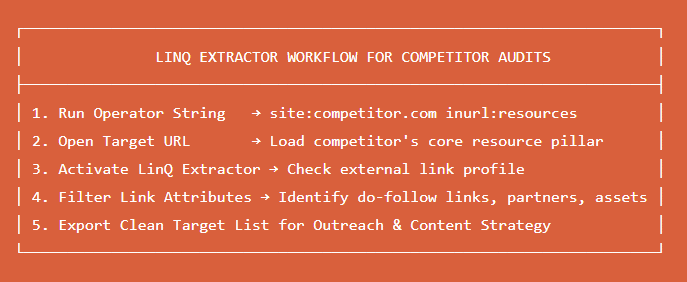
When analyzing a competitor’s top-performing resource page, activate LinQ Extractor to instantly surface:
- All external links embedded across the piece (exposing their data sources and research citations).
- Internal linking architecture (showing which commercial product landing pages they funnel authority toward).
- Do-follow versus no-follow link distribution in a single view.
If you want to turn these content audit findings into scalable search rankings, explore InfinitySoftHint SEO Services. Our team handles comprehensive competitive audits, keyword mapping, technical infrastructure optimization, and end-to-end content production to help your business build sustainable organic visibility.
6. Conclusion & Action Checklist
Auditing competitor content does not require expensive tool stacks. By mastering Google’s native search syntax, you can access live index data, uncover hidden content assets, track editorial cadence, and pinpoint high-value topic gaps with surgical precision.
Quick-Reference Search Operator Cheat Sheet
| Use Case | Search Operator Formula |
|---|---|
| Audit Content Taxonomy | site:competitor.com (inurl:blog OR inurl:guides OR inurl:resources) |
| Find Gated Assets & PDFs | site:competitor.com (filetype:pdf OR filetype:xlsx) "keyword" |
| Multi-Competitor Content Gaps | (site:compA.com OR site:compB.com) "topic" -site:yourdomain.com |
| Find BOFU Comparison Posts | site:competitor.com allintitle:"vs" OR "alternative" OR "review" |
| Track Recent Content Pivots | site:competitor.com/blog/ after:2025-01-01 "target term" |
| Find Industry Case Studies | site:competitor.com (inurl:case-studies OR intitle:"case study") "niche" |
| Audit Semantic Depth | site:competitor.com "core entity" AROUND(5) "sub topic" |
| Filter Out Brand Domain | intext:"competitor brand" -site:competitor.com |
Expand Your Search Operator Mastery
Continue strengthening your technical search operator capabilities with our companion guides:
- Core Fundamentals: What Are Google Search Operators?
- Complete Cheat Sheet: Google Search Operators Full List (2026 Edition)
- Technical Site Audits: Search Operators for Technical SEO
- Outreach & Link Building: Advanced Search Operators for Link Building & Guest Posts
- Digital PR & Monitoring: Advanced Search Operators for Digital PR